
Most people have to choose a Mac repair shop when they are least prepared to do it. The screen is black, the MacBook will not charge, coffee just spilled across the keyboard or an important deadline is getting closer.
Search for help and nearly every shop describes itself the same way: fast, affordable and experienced. Those words sound good, but they do not tell you who will actually open the Mac, how the problem will be diagnosed or what will happen to the data stored inside it.
At our counter, we regularly meet customers who were given a repair price without a clear explanation of what failed. Others were told that a complete logic board had to be replaced when the actual problem was confined to one section of the board. Sometimes the first recommendation was perfectly reasonable; the shop simply did not offer the kind of repair the Mac needed.
Different repair shops are built for different work. The important part is knowing what you are agreeing to before you leave your computer behind. These are the questions I would ask if I were handing someone my own Mac.
Start by asking where the repair is performed
The person accepting your Mac is not always the person who will repair it. Some storefronts handle basic work locally and send logic-board repairs or data-recovery jobs to another company. There is nothing automatically wrong with that arrangement, but it should be explained clearly.
If the Mac is being sent elsewhere, ask where it is going, who is responsible for it in transit and whether you will communicate with the technician or only with the original store. Every additional handoff adds time and another point where information about the symptoms can be lost.
For a routine battery or display replacement, this may not matter much. For liquid damage, an intermittent problem or a case involving important data, direct communication with the shop doing the work can make a real difference.
Find out whether the shop diagnoses failures or only replaces assemblies
Some Mac repairs are straightforward. A cracked display normally needs a display assembly. A worn battery normally needs a battery. The part is known, the labor is predictable and the shop may be able to quote the job from the model number.
No-power, charging and liquid-damage problems are different.
A MacBook that will not turn on could have a battery problem, a damaged USB-C port, a shorted capacitor, corrosion around a connector or a failure in one of several power circuits. Calling the logic board “dead” does not identify which of those things happened.
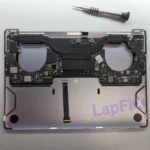
Many service providers solve board failures by replacing the complete logic board. That is a valid repair method, but it is often the most expensive option and may affect access to the original data. A shop that performs component-level logic board repair may be able to locate and repair the failed circuit while keeping the original board in the Mac.
Before approving the job, ask one direct question: “Are you repairing my original logic board or replacing it?” The answer affects the price, the data and what parts of the original computer will remain.
Data should be discussed before the repair begins
If the Mac still works and the files are important, make a current backup before bringing it in. Even a repair unrelated to the storage can expose a problem that was already developing.
If the Mac stopped working after liquid damage, do not keep turning it on to see whether it recovered. Liquid residue can remain conductive, and every power attempt gives contaminated circuitry another chance to cause damage. Leave it off and tell the shop that preserving the data is the priority.
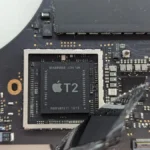
On older Macs with removable storage, a technician could often take out the drive and access it separately. Newer MacBooks are not built that way. On Macs with Apple silicon and Intel Macs with the T2 security chip, the internal storage is encrypted through hardware tied to the original system. In many models, the storage is also soldered directly to the logic board.
That means replacing the board may return the computer to working condition without returning the files that were on the original board. When the data matters, Mac data recovery may begin with repairing the original hardware well enough to boot and decrypt the storage.
We documented one example in our 16-inch MacBook Pro liquid-damage recovery. The customer had already replaced the computer. We repaired the damaged power circuitry because getting the original Mac running was the practical path to the files.
Ask whether the proposed work could erase the Mac, whether the original board will be retained and whether the shop will contact you before reinstalling macOS. Those questions should be answered before the repair, not after the data is gone.
Ask exactly what kind of replacement part will be installed
“Replacement screen” does not tell you enough. The part could be new genuine Apple, an original part removed from another Mac, refurbished or aftermarket. Batteries, keyboards, trackpads and complete top cases can also come from different sources.
Each option can have a place. An original pulled part may be a sensible choice for an older model when a new part is no longer available. A well-made aftermarket part may fit the budget for one repair, while color accuracy or finish may matter more for another. The problem is not that choices exist; the problem is when the choice is hidden from the customer.
Some newer Mac parts also require software calibration after installation. Ask whether the replacement needs configuration, whether the shop can complete it and whether any warning or disabled feature will remain afterward.
The estimate or invoice should identify what type of part you are paying for. A vague promise that everything is “OEM quality” is not the same as saying exactly what will be installed.
A low price is not useful if it leaves out half the job
The old version of this article recommended choosing a shop with flat-rate pricing. That advice was too broad.
Fixed pricing works well when the failure and required part are already known. It is much less reliable for a MacBook that has liquid damage, will not power on or has several possible causes. In those cases, a real diagnosis has to come before a final repair price.
Before leaving the Mac, ask:
- Is there a diagnostic or evaluation fee?
- Is that fee separate from the repair?
- Will I receive the findings and total price before work begins?
- What happens if I decline the repair?
- Are tax, shipping or other charges included in the estimate?
A professional shop should be able to explain its process without avoiding those questions. The cheapest number on the phone may only be a starting price. What matters is the amount you will actually pay and what work that amount includes.
Look for evidence of the work the shop actually performs
Terms such as “Mac expert” and “certified technician” are used loosely. If a certification matters to you, ask what it is and whether the person performing your repair holds it.
For advanced work, the better evidence is often the work itself. Does the shop show real repairs from its bench? Can it explain how it handles liquid damage, no-power failures and integrated storage? Does the technician understand the difference between replacing a logic board and repairing one?
Component-level work requires microscopes, microsoldering equipment, board diagnostics and experience interpreting power behavior. Data recovery requires another set of tools and procedures. A shop does not need to reveal customer information or every technical detail, but it should be able to explain what it does beyond “we fix Macs.”
The same standard applies to ordinary MacBook repair. Clear examples of battery, display, charging and board work tell you more than a long list of models copied onto a service page.
Read reviews for details, not only the star rating
A strong rating is useful, but the individual reviews matter more. Look for recent comments that describe a repair similar to yours. A detailed review about a liquid-damaged MacBook or a no-power logic-board repair tells you more than a one-line review that simply says the service was great.
Also read how the business responds when someone is unhappy. Repair work does not always produce the outcome a customer hoped for, especially with liquid damage or failing storage. A professional response should explain the situation without exposing private information or attacking the customer.
No business with a long history will have a perfect conversation with every customer. What you are looking for is a consistent pattern of clear communication, responsible handling and repairs that match the shop’s claims.
Make sure the warranty is explained in writing
“Warranty included” is incomplete. Ask how long it lasts, whether it covers both the installed part and labor, and what conditions are excluded.
A warranty on a replacement display does not normally cover a new crack or impact. A repair to one liquid-damaged circuit cannot guarantee that corrosion somewhere else will never cause another failure. Those are reasonable limitations, but they should be stated before the repair is approved.
Keep the final invoice. It should identify the Mac, the work performed, the part installed and the applicable warranty terms. If a problem returns, that document prevents the conversation from depending on memory.
Mail-in repair requires a clear process
If you are shipping the Mac, the quality of the intake process matters even more. Do not send a computer to an address found in a search result without first confirming the case with the repair center.
A proper mail-in repair process should give you a work-order or ticket number, packing instructions, the correct shipping address and an explanation of what happens after the Mac arrives. You should also know how the shop will communicate the diagnosis, obtain approval and handle return shipping.
Tell the shop before shipping if the battery is swollen, punctured or otherwise damaged. Damaged lithium-ion batteries can be unsafe to ship and may require different handling.
Questions worth asking before you leave your Mac
- Will the work be performed here or sent somewhere else?
- Are you repairing the original board or replacing it?
- Could the proposed repair erase or affect my data?
- What kind of replacement part will be used?
- Is there a diagnostic fee, and what does it cover?
- Will you contact me with the total price before proceeding?
- What warranty applies to the part and labor?
- What happens if the Mac cannot be repaired?
You do not need a technical background to ask these questions. A good technician should be able to answer them in plain language without making you feel that you are interrupting the process.
The right shop will not promise what it has not tested
Be careful with anyone who guarantees a diagnosis, repair price or data-recovery result before inspecting the Mac. The same symptom can come from several different failures, and liquid can damage more than one area.
An experienced shop will sometimes tell you that replacement makes more sense. It may also tell you that the computer can be repaired but the cost is not justified. That honesty is more valuable than a promise to fix every machine.
At LapFix, the purpose of the initial diagnosis is to determine what failed and what options are practical. Some jobs need a normal part replacement. Others need board-level work or a data-first approach. The recommendation should follow the evidence found in the Mac—not the service a shop happens to prefer selling.
The right Mac repair shop is not simply the one with the lowest advertised price or the closest address. It is the one that can explain who is doing the work, what will be done, how your data will be treated and what you will owe before an approved repair begins.