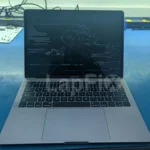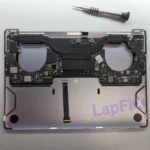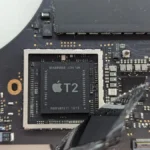

When a liquid-damaged MacBook with a T2 chip comes into the shop, one of the first questions we hear is: can you remove the SSD and copy the files from it?
On these MacBooks, the answer is usually no. The storage is built into the logic board, and the information on it is encrypted through hardware inside the original Mac. That does not mean the data is automatically gone when the MacBook stops turning on. It means the condition of the original logic board becomes a major part of the recovery.
In many cases, our job is to find the circuit that failed, repair the board enough to make the Mac stable and then copy the files while the original storage and security hardware are working together again.
What the T2 Chip Changes
Apple used the T2 Security Chip in a number of Intel-based Macs, including MacBook Pro and MacBook Air models introduced from 2018 through 2020. It handles several functions, but the important part for data recovery is its role in protecting the internal storage.
On a T2 MacBook, the data is encrypted even if the owner never manually turned on FileVault. When FileVault is enabled, the login password or recovery key provides another layer of protection. Either way, the storage depends on hardware in that original Mac.
This is very different from an older laptop with a removable hard drive. We cannot take the storage chips from a T2 MacBook, connect them to a reader and expect normal files to appear. Raw data without the working encryption hardware and the correct credentials is not useful.
We are not trying to bypass the Mac’s encryption. The practical recovery path is often to restore the original hardware to a condition where the Mac can recognize its own storage, start normally and accept the customer’s login information.
Liquid Damage Does Not Always Mean the Storage Is Damaged
A MacBook can be completely dead even when the storage, T2 chip and processor are still intact. The liquid may have damaged a USB-C charging circuit, a power rail, a connector or another small section of the logic board that the computer needs before it can start.
That distinction is important. If the failed part is away from the storage and security circuitry, repairing that part may be enough to bring the MacBook back online and make the files accessible again.
We do not assume the whole board is destroyed because we see corrosion, and we do not start replacing random parts. We remove the logic board, inspect the path of the spill under a microscope and check the affected power circuits before deciding what needs to be repaired.
Liquid residue can also hide under connectors and components. A board that looks fairly clean from above can still have corrosion underneath a chip or on connector pins. That is why repeated power attempts are risky: a circuit that might have been repairable can suffer more damage each time voltage is applied.
How We Approach Data Recovery on a T2 MacBook
The first step is to find out why the MacBook will not start. We check the USB-C power negotiation, look for abnormal current draw and test the main power rails for shorts or missing voltage. The results guide us to the part of the board that needs closer inspection.
If we find liquid damage, we clean the affected area and examine the surrounding components. Burned capacitors, corroded resistors, damaged connector pins and failed power-control components are common findings. The exact repair depends on where the liquid reached and what failed electrically.
When the data is the customer’s priority, the goal is not always to restore every function before making a copy. We first need the board stable enough to boot, unlock the encrypted volume and complete the transfer without the Mac shutting down in the middle of it.
Once the Mac starts, the customer’s login password or FileVault recovery key may still be required to unlock the data. We then connect an external drive, transfer the files and verify the copy before doing any additional work to the computer.
A T2 MacBook Recovery From Our Bench
We recently worked on a liquid-damaged 16-inch Intel MacBook Pro that the owner had already replaced. The computer itself was no longer important, but the files on it were.
During the inspection, we found corrosion in several areas and a damaged capacitor near the USB-C controller circuitry. After cleaning the board and completing the microsoldering repair, the Mac negotiated normal USB-C voltage, displayed the Apple logo and booted into macOS. We were then able to transfer the customer’s data to an external drive.
You can see the full inspection and repair in our 16-inch MacBook Pro liquid-damage data recovery case study.
When T2 MacBook Data Recovery May Not Be Possible
Logic-board repair can provide a path to the files, but it does not guarantee recovery. Severe damage to the T2 chip, processor, storage chips or internal layers of the board can make the data inaccessible. Previous repair attempts can also complicate the case if pads, traces or original components have been damaged or removed.
The condition of the board matters more than whether the MacBook looks bad from the outside. We have seen heavily contaminated boards where the important hardware survived, and cleaner-looking boards where the damage reached a critical part of the storage or security system.
That is why we evaluate the actual failure before discussing the recovery options. A MacBook that does not power on is a symptom, not a complete diagnosis.
What to Do After a Liquid Spill
If the MacBook has shut down, leave it off and disconnect the charger. Do not keep trying different USB-C ports, and do not use rice, a hair dryer or cleaning spray inside the computer.
If the files are more important than repairing the MacBook, tell the technician before work begins. A data-first diagnosis may be different from a normal repair, especially when an operating-system restore, board replacement or device exchange could affect access to the original storage.
Watch: T2 MacBook Data Recovery After Liquid Damage
In the video below, we explain why T2-equipped MacBooks require a different approach when liquid damage prevents access to the internal storage.
Need Help With a Liquid-Damaged MacBook?
LapFix performs MacBook logic-board repair and Apple data recovery in-house at our Alexandria, Virginia repair center. Customers outside the local area can begin through our nationwide mail-in repair and data recovery service.
If recovering the files is your main concern, make that clear when you contact us so we can approach the MacBook with the data as the first priority.